4 May 2026
Android app launched
Wenn Property is now available as an Android app on Google Play. Full sync with the web app — on the phone you already have.
Android New feature
Spend less time measuring, build more reliable estimates, and deliver more professional documentation to clients and suppliers.
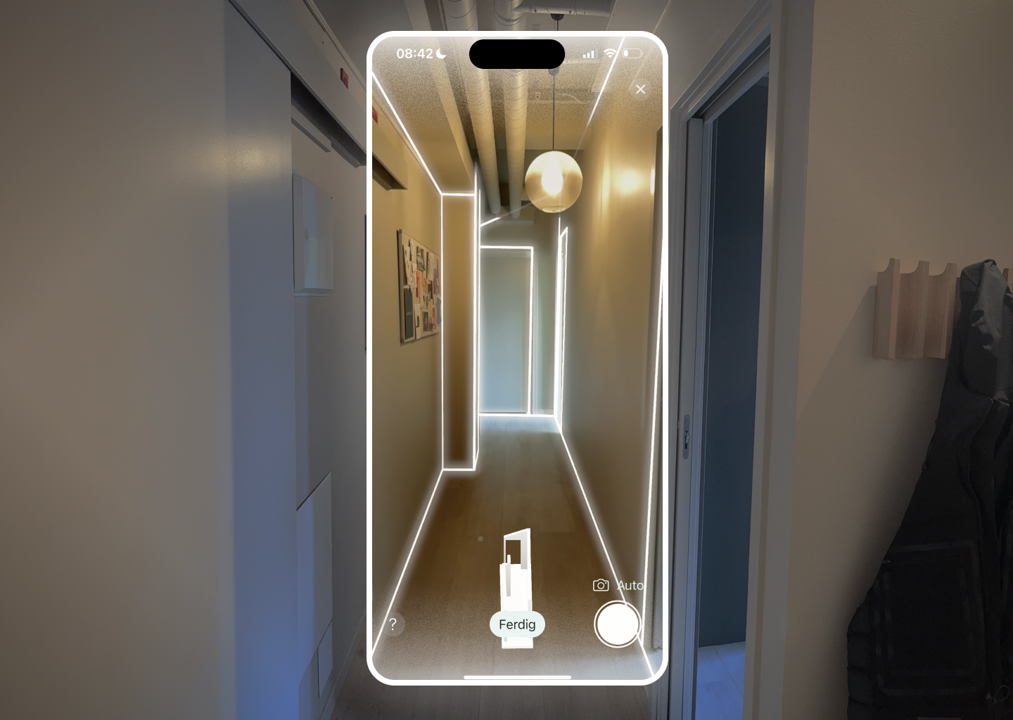
Scan the room with iPhone Pro or iPad Pro and get precise measurements of walls, floors, ceilings, and openings — done in five minutes. Use your time on the job, not on follow-up work. No LiDAR? See the drawing editor below.
The LiDAR sensor in iPhone measures distance with laser and gives accuracy of around 1–2 cm. Enough for most inspections — without expensive equipment.
Wenn Property draws the floor plan for you, with room names, dimensions, and door and window placement. No manual drafting.
LiDAR scanning works indoors. For roofs and facades we have a dedicated solution — see “Roof and facade” below.
Export to PDF, IFC, Excel, and more. The IFC file opens directly in Revit, ArchiCAD, and SketchUp — from iPhone, without a laser scanner.
Most people working with roofs have used the same method for years: count tiles from the ground or estimate the area from Google Maps. Both give you an approximate number. With Wenn Property you look up the address and get exact roof surfaces and exterior measurements from public registries — in seconds. No site visit required to give the client an estimate.
“One of our customers discovered he had quoted a roof job 20 % too low with the old method. The error became obvious the moment he looked up the address in Wenn Property.”
No manual measuring — the tool pulls roof surfaces, pitch, and wall area automatically from public registries.
No LiDAR or special hardware required. Just a browser and an address.
Download roof surfaces with measurements for use in estimates and quotes — no manual totalling.
Dictate observations on the roof and facade as you go, and get a structured inspection report ready the same day.
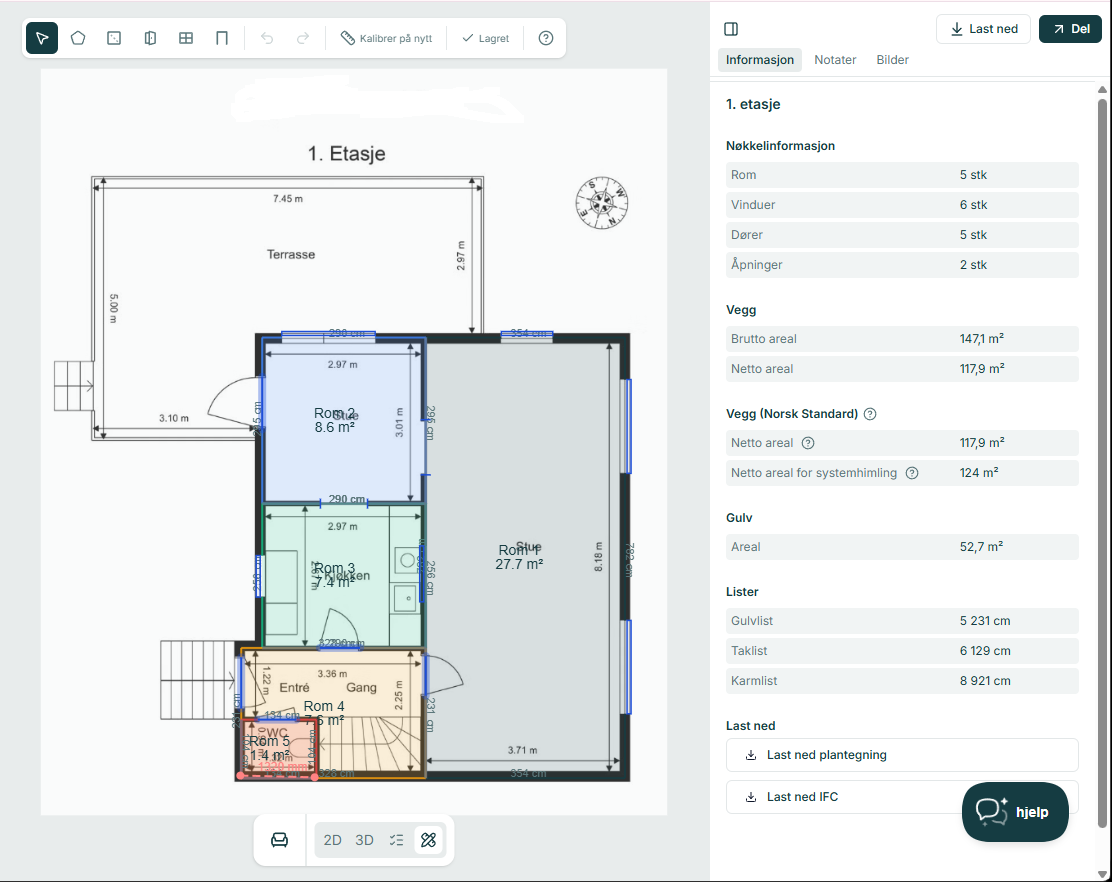
Don't have an iPhone with LiDAR, or prefer to draw yourself? Use the browser-based drawing editor to create the floor plan manually. The system automatically converts it to a full 3D model with all quantity data — no scanning, no special equipment.
Use a mouse or fingertip on a tablet. Draw walls, add doors and windows, name the rooms. Done in minutes — no app download needed.
The system converts the 2D floor plan into a complete 3D model with real heights and volumes. Everything is calculated automatically.
Gross and net wall area, floor area, ceiling height, skirting lengths, and openings — calculated to Norwegian standards. Accuracy depends on how precisely you drew.
Add voice notes, photos, and a scope of work from the inspection. Everything in one job — with or without 3D scanning.
Speak your observations as you walk — room by room or for the whole property. The Inspection Assistant transcribes and structures everything automatically into a neat, logically organised inspection note ready for estimates, reports, or emails to the client.
Dictate what you see: wall colour, damage, condition, work to be done. AI organises it automatically by room and trade — no typing while you walk.
After the inspection you have a clean, logically structured note ready to use — no editing needed. Paste it straight into your estimate or send it to the client.
The Inspection Assistant is available whether you scan with LiDAR or draw in the browser. Use it on its own or combined with a 3D model.
The voice recording is deleted after transcription. Only the structured note is stored — in line with GDPR.
Automatic quantity takeoff from the 3D model gives you an estimate you can stand behind. Combine with inspection notes and photos for a complete project basis.
Gross and net wall area, floor area, ceiling height, skirting lengths, and openings — calculated to Norwegian standards. No manual adding up.
Tick off work per room and trade in a structured matrix. AI suggests entries based on inspection data. Export to PDF.
Add photos and comments. See each wall from the front with doors, windows, and exact dimensions — a complete picture of the scope of work.
PDF, IFC, Excel, and more. The IFC file opens directly in Revit, ArchiCAD, and SketchUp — from the browser, without conversion tools.
Connect your preferred AI agent via MCP, and let it work with your goals, data, and workflows.
Wenn Property works across every device your team already owns. Scan with LiDAR on iPhone Pro, document inspections on Android, and manage projects from any browser — everything stays in sync.
| Feature | iOS (iPhone/iPad) | Android | Web |
|---|---|---|---|
| Inspection Assistant | |||
| Photos and notes | |||
| 3D scanning with LiDAR | |||
| 3D from floor plan | |||
| Roof and facade from address lookup | |||
| View and share projects | |||
| Team collaboration |
Android devices don't have LiDAR, so 3D scanning happens on iPhone or iPad. But any user can generate a full 3D model with quantity data from a floor plan drawing in the web app — no special hardware needed.
See how Wenn Property solves everyday challenges in your industry.
Save hours on every job. Scan, calculate, and share with suppliers — without going back to re-measure.
Learn more →Get exact roof measurements without driving out. Look up the address, export to Excel, and send the quote the same day.
Learn more →From physical space to precise 3D model in minutes. Export to IFC and use the model in your design software.
Learn more →Keep your housing portfolio organised digitally. Map conditions and plan maintenance with documented data.
Learn more →Document damage extent precisely with 3D. Quantity takeoff without interpretation disputes.
Learn more →Keep your private property portfolio organised digitally. Document conditions, plan maintenance, and share with contractors.
Learn more →New features and improvements are published continuously in What's New. Here are the latest updates directly from the product team.
4 May 2026
Wenn Property is now available as an Android app on Google Play. Full sync with the web app — on the phone you already have.
11 March 2026
New detail sheet in XLSX, comma decimals in CSV, and a fix for Norwegian characters in Excel on Windows. Exports now open correctly out of the box in Norwegian Excel.
11 March 2026
Share and Download are now separate buttons. A new download modal brings PDF exports, floor plans, and quantities together in one place, and sharing is easier than before.
11 March 2026
Select multiple roof surfaces and walls at once, see the total area for the full building, and export roof geometry directly to Excel and CSV.
Get started in minutes — no commitment.